
WiFi QR Code Generator
Create a free QR code for your Wi-Fi in seconds. Guests point their phone camera at it and join your network — no spelling out the password. Print it as a ready-made Wi-Fi sign or download the code as PNG or SVG.
Enter your network name and password to see your Wi-Fi QR code
“Print 4″ × 6″” fits a standard photo frame — print at 100 % (“Actual size”) and cut on the dashed line.
Free, no sign-up, no watermark. A static QR code: it never expires, but make a new one if you change the password.
Paper curls. Get a Wi-Fi sign that stays put.
Fill in your Wi-Fi above first and it carries over to the designer automatically.
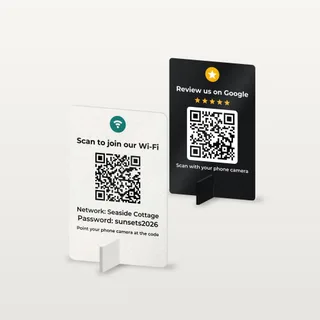
Acrylic Wi-Fi QR Code Sign
From $19.90 with stand
Your Wi-Fi QR code, headline and logo UV printed on 1/8″ acrylic that stands on its own foot. For counters, front desks and waiting rooms — test-scanned before it ships.
Design your acrylic signAirbnb Wi-Fi Sign
From $19.90 with stand
For Airbnb, VRBO and vacation rental hosts: your house name on top, guests scan and join. Fewer “what's the Wi-Fi?” messages, nicer listing photos.
Design an Airbnb Wi-Fi signHow to make a QR code for Wi-Fi
A Wi-Fi QR code holds your network name, password and security type. When someone scans it, their phone offers to join the network — nothing to type. Here's how to create one in under a minute:
- 1
Enter your network name and password
Type the Wi-Fi network name (SSID) exactly as it appears in your phone's Wi-Fi list, then the password. Keep the security on WPA/WPA2/WPA3 unless your router says otherwise.
- 2
Check the preview
Your Wi-Fi QR code appears instantly. Add a headline and your business or house name, choose a color, and scan the preview with a second phone to make sure it joins.
- 3
Print or download it
Print a full-page Wi-Fi sign, a 4″ × 6″ sign for a frame or four table cards per page — or download the QR code as PNG or SVG for your own design.
Made to order in the US
Turn your Wi-Fi QR code into an acrylic sign
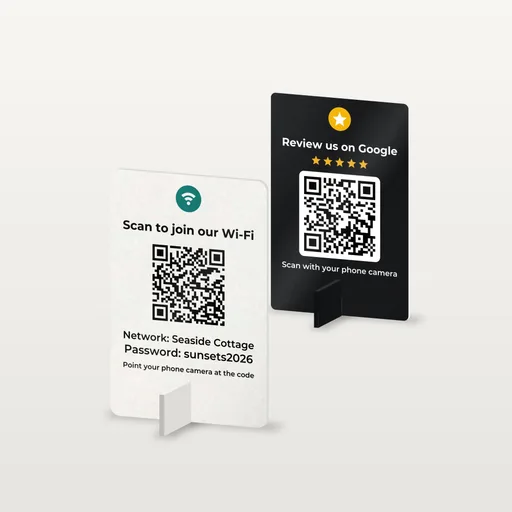
A paper printout curls, fades and ends up under a coffee cup. Our Wi-Fi QR code sign is UV printed in full color on 1/8″ acrylic and stands on its own slot-in acrylic foot — on a counter, a front desk or a nightstand. Your network name and password carry over from the generator above.
- 4″ × 6″ $19.90 · 5″ × 7″ $24.90 — stand included
- White, black, gold, silver, bronze or glitter acrylic; classic, rounded or arch shape
- Your headline and logo, plus the network name and password if you like
- QR code prints black on a white panel on every color — we test-scan each sign
How to scan a Wi-Fi QR code on iPhone and Android
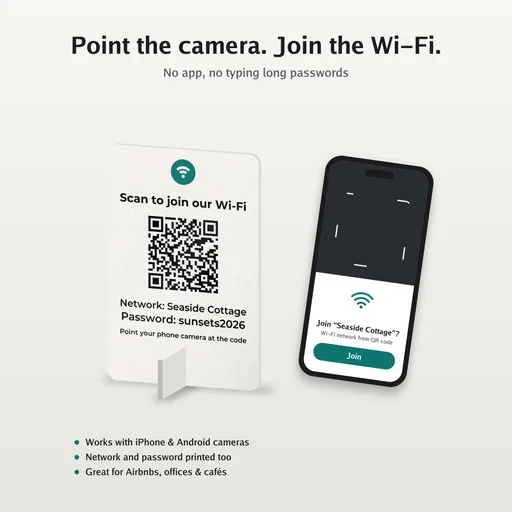
Modern phones read Wi-Fi QR codes with the built-in camera — guests don't need a QR scanner app.
iPhone and iPad
- Open the Camera app and point it at the Wi-Fi QR code.
- Tap the “Join network” banner that appears.
- Tap Join — the iPhone connects without asking for the password.
Android and Samsung
- Open the Camera app (or Google Lens) and point it at the code, then tap Connect.
- Or go to Settings → Wi-Fi and tap the QR icon next to “Add network”.
- Samsung: the Camera app and the QR icon in Wi-Fi settings both work.
Button names vary a little between phone models and system versions. If the camera doesn't react, make sure the whole code, including its white border, is in the frame.
Is it safe to share your Wi-Fi password with a QR code?
Making the code here is safe: it's generated in your browser and your network name and password never leave your device. The code itself is not encrypted, though — anyone who scans it, or reads the password printed under it, can join your network.
That's the point for guests, so the safe setup is a separate guest network on your router. Your own computers, cameras and smart-home devices stay on the main network, and you can change the guest password between rentals or seasons without touching anything else.
Where to put your Wi-Fi QR code
Airbnb & vacation rentals
On the entry table or a nightstand, with your house name on top — guests are online before they unpack.
Cafés & restaurants
A small sign at the counter or a card on every table saves staff from spelling out the password.
Hotels & B&Bs
One sign per room plus one at the front desk. Use a different guest network per floor if you like.
Offices & waiting rooms
Visitors and clients join the guest network on their own — no IT ticket, no sticky note.
Salons, clinics & shops
Customers waiting for an appointment connect in seconds, which makes the wait feel shorter.
Home, parties & events
Stick a code on the fridge for friends and family, or on a table at a wedding or a conference.
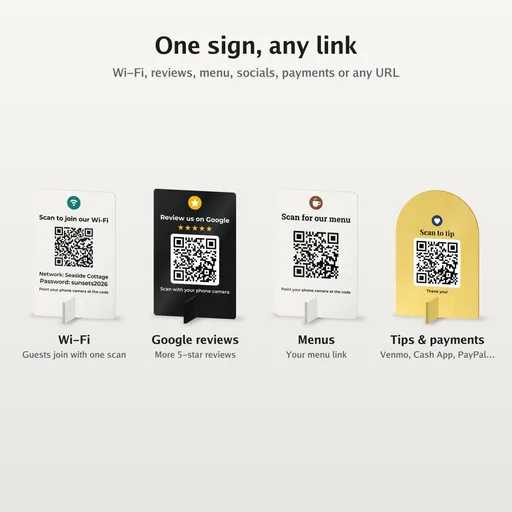
Hosting on Airbnb or VRBO? Our Airbnb Wi-Fi sign puts your house name on top, and matching review and house-rules signs are made with the same QR code sign maker .
Wi-Fi QR code tips
Use a guest network
Anyone who scans the code gets your password. A separate guest network keeps visitors away from your own laptops, cameras and smart-home gear.
Match the name exactly
Network names are case-sensitive: “Cafe-Guest” and “cafe-guest” are different networks. Copy the name from your phone's Wi-Fi list.
Pick a readable password
If you print the password too, avoid look-alike characters such as l, 1 and I or O and 0 — some guests will type it on a laptop.
New password, new code
The password is stored inside the code itself. If you change it on the router, make and print a new Wi-Fi QR code.
What size should a Wi-Fi QR code be?
Print roughly 1 inch of QR code per 10 inches of scanning distance, dark on a light background, with a white border around it.
| Where | QR code size | Scan distance |
|---|---|---|
| Table card, fridge, nightstand | 1.5–2 in (4–5 cm) | Up to 2 ft |
| Counter or front-desk sign | 2.5–3 in (6–8 cm) | 2–3 ft |
| Wall sign in a café or lobby | 4 in+ (10 cm+) | 3–6 ft |
| Poster or event banner | 8 in+ (20 cm+) | 8 ft+ |
Printable Wi-Fi sign or acrylic Wi-Fi sign?
The free printable sign is the quickest start. For a business or a rental where the sign lives on the counter for years, an acrylic sign looks the part and survives cleaning.
| Option | Best for | Durability | Price | Link |
|---|---|---|---|---|
| Free printable sign | Today, at home, short-term events | Paper — fades, curls, gets spilled on | Free | Make it above |
| Acrylic Wi-Fi sign 4″ × 6″ | Nightstands, entry tables, counters | 1/8″ acrylic, full-color UV print, own stand | $19.90 with stand | Design yours |
| Acrylic Wi-Fi sign 5″ × 7″ | Front desks, host stands, lobbies | 1/8″ acrylic, full-color UV print, own stand | $24.90 with stand | Design yours |
Wi-Fi QR code FAQ
How do I create a QR code for my Wi-Fi?
Enter your Wi-Fi network name (SSID) and password in the free generator on this page, keep the security on WPA/WPA2/WPA3, and your Wi-Fi QR code appears instantly. Print it as a ready-made Wi-Fi sign or download it as PNG or SVG. No account needed.
Is this Wi-Fi QR code generator free?
Yes. There's no sign-up, no watermark and no limit. You can print as many Wi-Fi signs and table cards as you like, and use the PNG or SVG in your own designs.
Is it safe to enter my Wi-Fi password here?
Yes. The QR code is created in your browser, on your device — your network name and password are never sent to our servers or stored. Keep in mind that anyone who scans the printed code can join, so use a guest network for signs in public places or rentals.
Do Wi-Fi QR codes work on iPhone and Android?
Yes. iPhones read Wi-Fi QR codes with the built-in Camera app and show a “Join network” prompt. Android phones read them with the Camera app, Google Lens or the QR icon in Wi-Fi settings. No extra app is needed.
Does a Wi-Fi QR code expire?
No. It's a static QR code: the network name and password are stored in the code itself, not behind a link, so it works as long as your Wi-Fi details stay the same. If you change the password or the network name, make a new code.
Which security type should I choose?
Choose WPA/WPA2/WPA3 for almost every home and business router made in the last 15 years. Choose WEP only for very old routers, and “No password” for open networks such as a public café hotspot.
Can I make a QR code for a hidden Wi-Fi network?
Yes. Tick “Hidden network” and the code tells the phone to look for a network that doesn't broadcast its name. Hidden networks connect a little less reliably on some phones, so test the code before you print it.
Should I print the Wi-Fi password on the sign too?
Usually yes. Guests connecting a laptop, tablet or an older phone can type it by hand. The generator prints the network name and password under the code by default — untick the option if you only want the QR code.
What size should a Wi-Fi QR code be?
Print about 1 inch of QR code for every 10 inches of scanning distance: 1.5–2 in on a table card, 2.5–3 in on a counter sign, 4 in or more on a wall. Keep it dark on a light background with a white border around it.
Can I get a Wi-Fi QR code sign that lasts?
Yes. We print Wi-Fi QR code signs in full color on 1/8″ acrylic with a slot-in acrylic stand, 4″ × 6″ or 5″ × 7″, from $19.90. Your network name and password carry over from this generator, and we test-scan every sign before it ships.
A Wi-Fi sign guests actually notice
Full-color acrylic with your logo and a stand that slots in — no tools, no glue. Preview it live, and we test-scan the QR code before it ships.